 shizoor
 Note that this is now a paid service, as in you have to pay twitter to do this. 😢
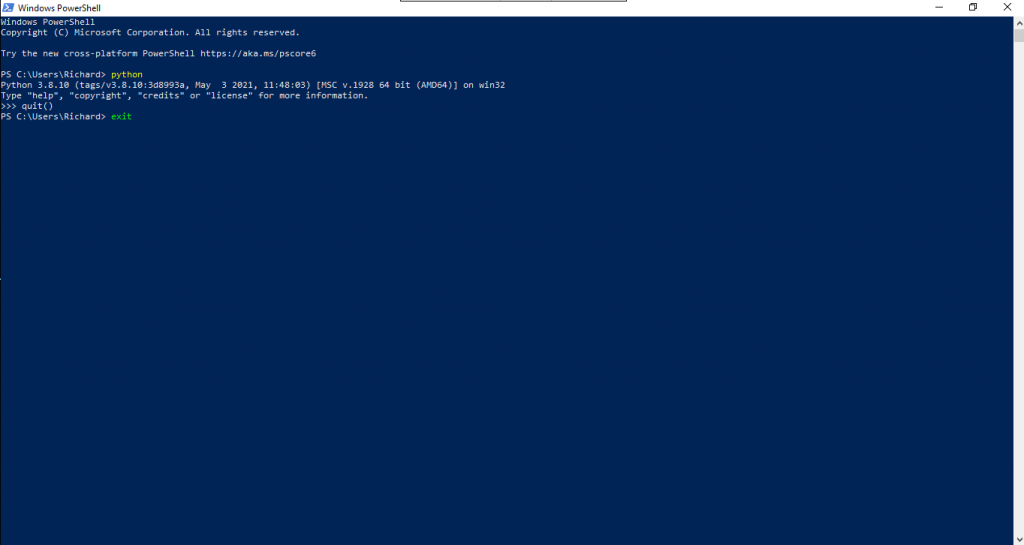
First, install python. To install python, just google “Install python” and follow the instructions for your OS. Ensure it’s python3, not 2. To verify python is installed, run it from the command prompt. For Windows machines, IMO it’s better to run python from Powershell. Type Powershell in from the search bar next to the start prompt, then type in python to verify it’s installed. To quit, type quit() and press enter, then type exit and press enter to close the window.
Then you need to activate developer access on your twitter account.
To do that, follow this tutorial :
Once you have the secret and API key, take this code and copy and paste into a file, call it gettweets.py. Bear in mind that spaces matter here as under Python they control how your program works. To get the following code I modified this code a bit to get round the fact that some tweets are stored in a different object attribute depending on how long they are and if they’re a reply. https://gist.github.com/seankross/9338551
That issue is explained here : https://stackoverflow.com/questions/48966176/tweepy-truncated-tweets-when-using-tweet-mode-extended
The 3200 tweet limit is imposed by twitter, it may be possible to get round it, I’ll look into that if this isn’t useful enough.
import sys
import csv
import json
import os
import tweepy as tw
import pandas as pd
from datetime import datetime


bearer_token = ""

consumer_key = ''  # API key
consumer_secret = ''  # API Secret Key
access_token = ''
access_token_secret = ''

auth = tw.OAuthHandler(consumer_key, consumer_secret)
auth.set_access_token(access_token, access_token_secret)
api = tw.API(auth, wait_on_rate_limit=True)


def save_json(file_name, file_content):
    with open(path + file_name, 'w', encoding='utf-8') as f:
        json.dump(file_content, f, ensure_ascii=False, indent=4)


path = datetime.now().strftime('%d-%m-%Y%H%M%S')


def get_all_tweets(screen_name):
    # initialize a list to hold all the Tweets
    alltweets = []
    outtweets=[]
    # make initial request for most recent tweets
    # (200 is the maximum allowed count)
    new_tweets = api.user_timeline(screen_name=screen_name, count=200, tweet_mode='extended')
    # save most recent tweets
    alltweets.extend(new_tweets)
    # save the id of the oldest tweet less one to avoid duplication
    oldest = alltweets[-1].id - 1
    # keep grabbing tweets until there are no tweets left
    while len(new_tweets) > 0:
        print("getting tweets before %s" % (oldest))
        # all subsequent requests use the max_id param to prevent
        # duplicates
        new_tweets = api.user_timeline(screen_name=screen_name, count=200, max_id=oldest, tweet_mode='extended')
        # save most recent tweets
        alltweets.extend(new_tweets)
        # update the id of the oldest tweet less one
        oldest = alltweets[-1].id - 1
        print("...%s tweets downloaded so far" % (len(alltweets)))
        ### END OF WHILE LOOP ###


    for tweet in alltweets:
        outtweet = [tweet.id_str, tweet.created_at, '', tweet.favorite_count, tweet.in_reply_to_screen_name,tweet.retweeted, tweet.retweet_count, 'https://www.twitter.com/'+screen_name+'/status/'+tweet.id_str]
        try:
            outtweet[2] = tweet.retweeted_status.full_text
        except:
            outtweet[2] = tweet.full_text
        outtweets.append(outtweet)


    # write the csv
    with open(path + '%s_tweets.csv' % screen_name, 'w') as f:
        writer = csv.writer(f)
        writer.writerow(["id", "created_at", "text", "likes", "in reply to", "retweeted", "retweet count", "uri"])
        writer.writerows(outtweets)
    pass


def tweetcollect(url, recursionlevel):
    # Use a breakpoint in the code line below to debug your script.
    print('Hi, {url}', recursionlevel)  # Press Ctrl+F8 to toggle the breakpoint.


def tweetsend(tweettext):
    api.update_status(tweettext)


# Press the green button in the gutter to run the script.
if __name__ == '__main__':
    username='NASA'
    print ('Getting all tweets from '+username)
    get_all_tweets(username)
Now (important) get the consumer_key, consumer_secret, access token and access token secret you noted down earlier from the youtube tutorial, and paste them between the quotes in the relevant part of the file at the top., as in :
consumer_key = ‘CONSUMER_KEY_GOES_IN_HERE’
Once you’ve done that,you don’t want to download all Nasa’s tweets, well you might to see how this works, but to change that, change the value for username close to the end of the file.
Run by typing python3 followed by what you called your file. On my linux machine that looked like this :
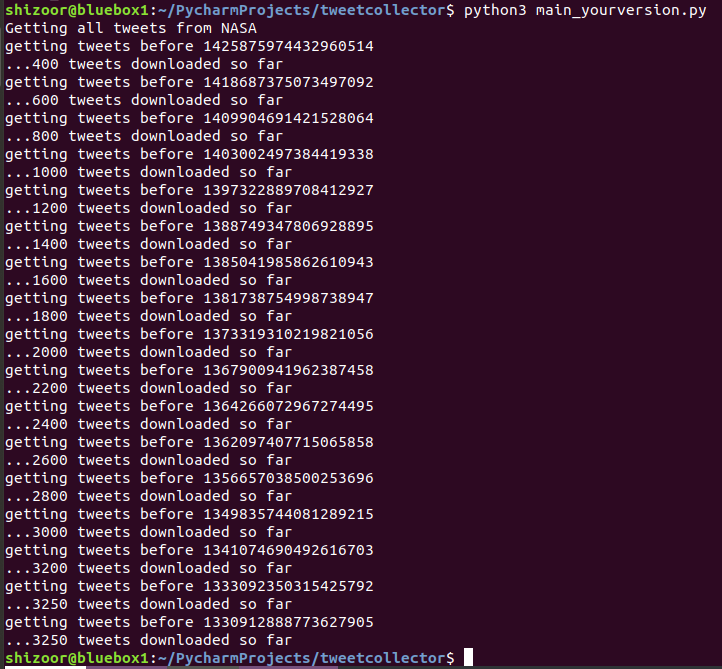
This will output a file you can open with a spreadsheet package, like Microsoft Excel or OpenOffice Calc, allowing you to look at a large number of tweets without having to scroll down someone’s timeline relentlessly. You can do more fun things with the data like search for particular terms used etc.
It makes sense to format the first column as text.
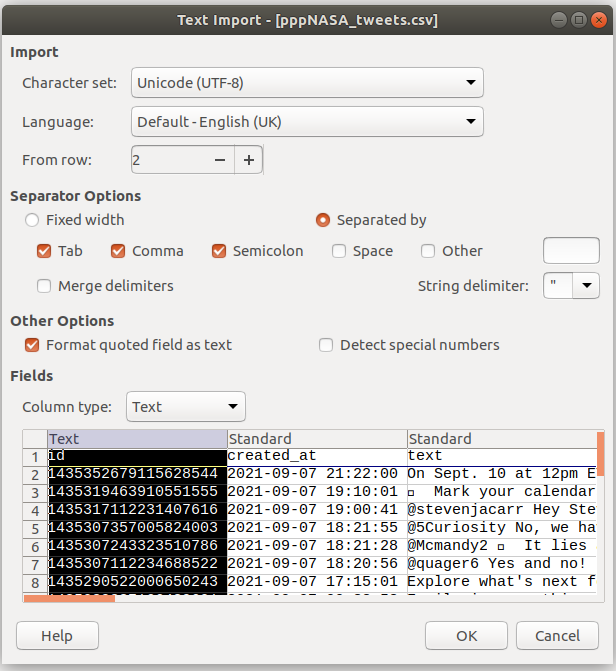
Click OK and Bob’s your Monkhouse.
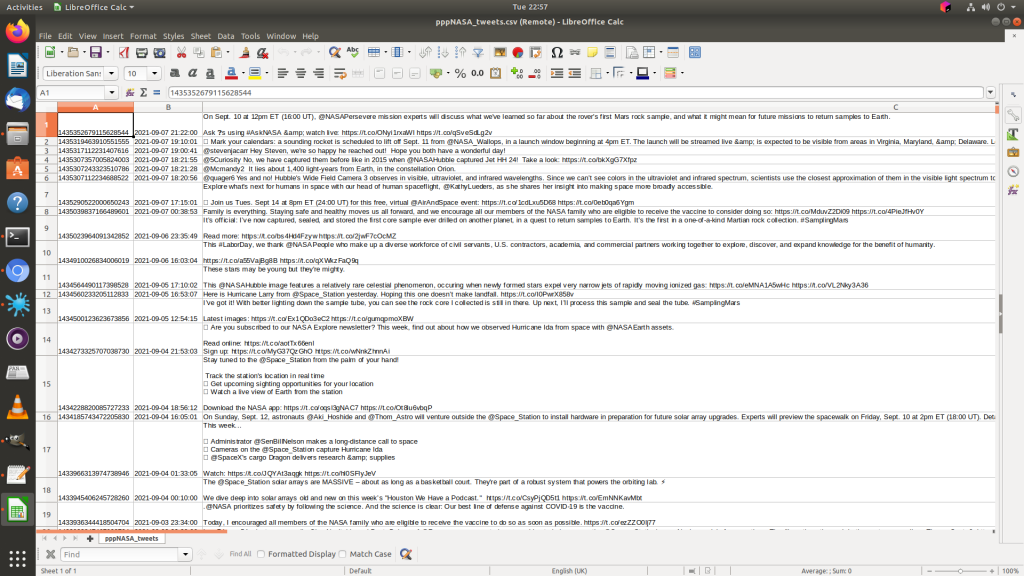
As I said this has been done on Linux, but is possible under Windows and Mac. A more user friendly way of doing it may have been to download PyCharm, so if your machine is high spec enough, give it a go.
Also I did run into problems as tweepy and pandas were not installed, I was able to install them with the following commands :
python3 -m pip install tweepy
python3 -m pip install pandas
Any problems drop me a DM, but bear in mind I’m busy a lot of the time. Also DO NOT SHARE THE API TOKEN, CONSUMER KEY OR ANY OF THAT WITH ANYONE. It can be used to hijack your twitter account.
The for loop can be customised in order to bring in different attributes of the “tweet” object, such as number of retweets in “retweet_count”. Here I’ve added a part containing the URL of the tweet.
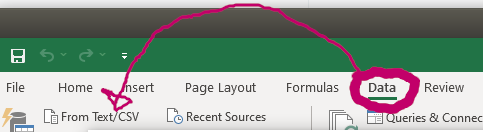
Say you’re importing this using Excel, open a blank worksheet, click “Data” then import from CSV / Text.
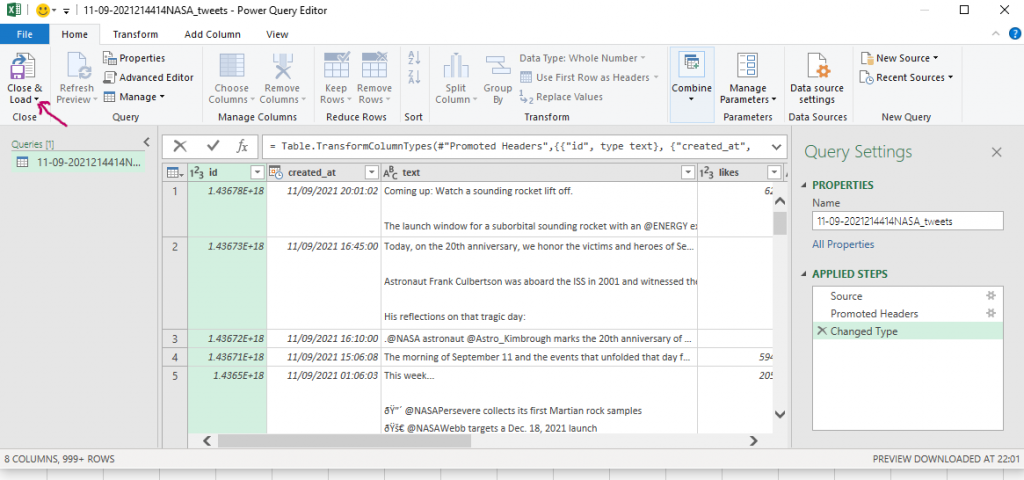
Click “transform” and change the data type for “id” to text in order to preserve the tweet ids. Change “Int64.Type” to “type text”.

Once it look like this, click close and load :
Now your sheet will load up, but you can’t click on the URLs yet, you need to convert these to hyperlinks. You can copy and paste into a browser but that’s fiddly.
I’ve left the hyperlinks to the far right to make this easier, but if you don’t like it like this you can edit the python.
Now, to make the URLs hyperlinks so you can click on them, scroll over to the cell to the right of the hyperlinks cell, and type “=hyperlink(“, then press the left arrow key to select the URI cell, then press enter then close the bracket.
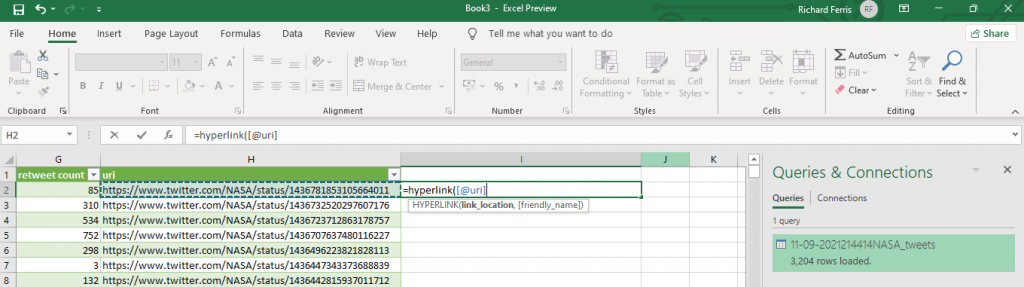
Excel will see what you’re trying to do and will make a new column that’s clickable :

Clicking each will open a new tab in your browser to view the tweet.
Things still aren’t perfect, sometimes retweets and likes are wrong but this might be incorrect from the API itself.
About The Author

To collect from a list of usernames defined in a file :
import sys
import csv
import json
import os
import tweepy as tw
import pandas as pd
from datetime import datetime
bearer_token = “” \
” ”
consumer_key = ” # API key
consumer_secret = ” # API Secret Key
access_token = ”
access_token_secret = ”
auth = tw.OAuthHandler(consumer_key, consumer_secret)
auth.set_access_token(access_token, access_token_secret)
api = tw.API(auth, wait_on_rate_limit=True)
def save_json(file_name, file_content):
with open(path + file_name, ‘w’, encoding=’utf-8′) as f:
json.dump(file_content, f, ensure_ascii=False, indent=4)
if (len(sys.argv) < 2):
print ("Usage : tweetcollect “)
sys.exit()
#Amend path to a path suitable for your system.
path = ‘/home/shizoor/PycharmProjects/tweetcollector/fash/’+datetime.now().strftime(‘%d-%m-%Y%H%M%S’)
listfile = sys.argv[1]
text_file = open(listfile, “r”)
usernames=text_file.read().split(“\n”)
print (“Usernames : “, usernames)
text_file.close()
def get_all_tweets(screen_name):
# initialize a list to hold all the Tweets
alltweets = []
outtweets=[]
# make initial request for most recent tweets
# (200 is the maximum allowed count)
new_tweets = api.user_timeline(screen_name=screen_name, count=200, tweet_mode=’extended’)
# save most recent tweets
alltweets.extend(new_tweets)
# save the id of the oldest tweet less one to avoid duplication
try:
oldest = alltweets[-1].id – 1
except:
print(“exception! Contents of alltweets:”, alltweets)
# keep grabbing tweets until there are no tweets left
while len(new_tweets) > 0:
print(“getting tweets before %s” % (oldest))
# all subsequent requests use the max_id param to prevent
# duplicates
new_tweets = api.user_timeline(screen_name=screen_name, count=200, max_id=oldest, tweet_mode=’extended’)
# save most recent tweets
alltweets.extend(new_tweets)
# update the id of the oldest tweet less one
oldest = alltweets[-1].id – 1
print(“…%s tweets downloaded so far” % (len(alltweets)))
### END OF WHILE LOOP ###
# transform the tweepy tweets into a 2D array that will
# populate the csv
#outtweets = [[tweet.id_str, tweet.created_at, tweet.extended_tweet[“full_text”], tweet.favorite_count, tweet.in_reply_to_screen_name,
# tweet.retweeted] for tweet in alltweets]
for tweet in alltweets:
outtweet = [tweet.id_str, tweet.created_at, ”, tweet.favorite_count, tweet.in_reply_to_screen_name,tweet.retweeted, tweet.retweet_count, ‘https://www.twitter.com/’+screen_name+’/status/’+tweet.id_str]
try:
outtweet[2] = tweet.retweeted_status.full_text
except:
outtweet[2] = tweet.full_text
outtweets.append(outtweet)
# write the csv
with open(path + ‘%s_tweets.csv’ % screen_name, ‘w’) as f:
writer = csv.writer(f)
writer.writerow([“id”, “created_at”, “text”, “likes”, “in reply to”, “retweeted”, “retweet count”, “uri”])
writer.writerows(outtweets)
print(“csv written to: “+path + ‘%s_tweets.csv’ % screen_name)
pass
def tweetsend(tweettext):
api.update_status(tweettext)
if __name__ == ‘__main__’:
for username in usernames :
print (‘Getting all tweets from ‘+username)
if len(username)>0:
try:
get_all_tweets(username)
except:
print(“tweepy error”)
else:
print(“empty username!”)